Audit Ready Reports — PDF, Excel & CSV.
One tap generates everything your accountant or auditor needs — IRS-compliant PDF packets with receipt images, or clean columnar spreadsheets that plug straight into QuickBooks, Xero, or Excel.
1 tap
PDF, Excel, or CSV — your choice
3
Export formats — PDF, Excel & CSV, all in one app
IRS
Rev. Proc. 97-22 compliant digital receipts
Auto
Formatting. Zero spreadsheet cleanup needed
The Right Format for Every Situation.
Not every report is for the same audience. TaxLens gives you both — choose what you need.

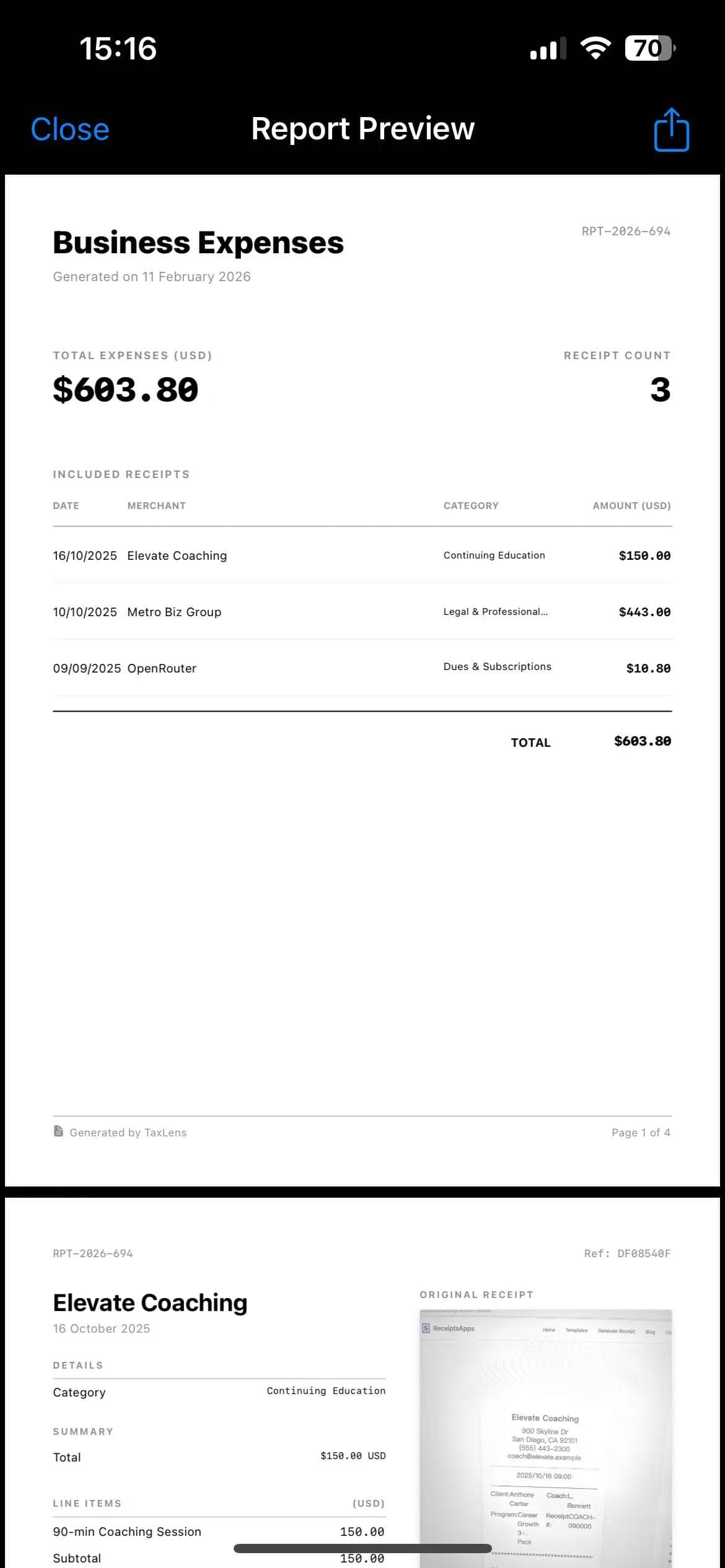
PDF Audit Report
Best for: Auditors, CPAs, Reimbursement
- ★Side-by-Side Proof: Structured expense data paired with high-res receipt images on the same page.
- ★Categorized Summaries: Auto-grouped by IRS tax category (e.g., all "Meals" together).
- ★Permanent Digital Copy: Thermal paper fades — your digital records never will.
- ★IRS Compliant: Meets IRS Revenue Procedure 97-22 for electronic record acceptance.

Excel / CSV Export
Best for: Accountants, Bookkeeping Software
- ★Clean Columnar Data: Date, Merchant, Category, Tax, and Total — all perfectly separated columns.
- ★Universal Compatibility: Standardized format ready for QuickBooks, Xero, Wave, and Google Sheets.
- ★Multi-Currency Ready: Shows original currency alongside the converted home currency in separate columns.
- ★No Manual Cleaning: Zero reformatting needed — import directly without mapping columns.
Built for Every Export Scenario.
Whether you're filing taxes, chasing reimbursements, or closing the books — there's a report for that.
For Your CPA
Generate a full-year PDF audit packet grouped by IRS tax category, with receipt images embedded. Hand it to your accountant and you're done.
For Reimbursements
Filter by date range and Business expenses only. Export a clean PDF showing only what your employer needs — no personal items, no noise.
For Bookkeeping
Export a CSV with 10+ columns — Date, Merchant, Category, Tax, Currency, and more. Drop it straight into QuickBooks, Xero, or Google Sheets with zero reformatting.
No More Taping Receipts to Paper.
Auditors and accountants don't just want numbers — they need proof. Generic apps fail to deliver both in one place.
✕The Old Way
- • Taping faded thermal receipts to printer paper for your CPA.
- • Messy CSVs with missing columns and unformatted dates that take hours to fix.
- • Spreadsheets completely detached from their original receipt images.
- • Switching between two different apps for PDF and spreadsheet exports.
✓TaxLens Reports
- ★ One app, all formats — PDF, Excel, and CSV in a single tap.
- ★ Filter by date range (month, quarter, full year) or expense type.
- ★ Share instantly via Email, iMessage, AirDrop, or Slack.
- ★ Receipts digitally preserved forever — no more faded thermal paper.
Send a Single Receipt as a Polished PDF in Seconds.
Don't need a full report? Just tap any receipt and share it as a clean, professional PDF — complete with merchant info, itemized amounts, tax, and the original receipt image. Perfect for quick client invoices or single expense reimbursements.
- Receipt image + structured data on one page
- Share via Email, AirDrop, Slack, or iMessage in one tap
- No need to export an entire report for a single expense
Starbucks
Mar 15, 2025 · Business Meal
 PDF Ready
Frequently Asked Questions
Are digital receipts accepted by the IRS in an audit?
Yes. Under IRS Revenue Procedure 97-22, electronic receipts are fully accepted as long as they are legible and accurately reproduce the original. TaxLens's high-res scanning and PDF generation meets these standards perfectly.
Can I import TaxLens CSV files directly into QuickBooks?
Yes. Our CSV structure is designed for direct compatibility with QuickBooks, Xero, Wave, and other major accounting platforms. You won't need to manually remap any columns.
Can I select a specific date range for my report?
Absolutely. You can generate reports for a specific month, quarter, or full fiscal year, and optionally filter to include only "Business" deductible expenses.
How do I share my report with my accountant?
With one tap, share via Email, Slack, iMessage, or AirDrop directly from your iPhone's native share sheet — no third-party cloud service required.
Ready to impress your accountant?
Download TaxLens and generate your first audit-ready report in under a minute.
Explore More TaxLens Features
Everything you need to automate bookkeeping and file with confidence.
AI Receipt Scanner
Scan receipts with 99% accuracy using context-aware AI.
Itemized Receipt Scanner
Extract every line item to split business and personal expenses easily.
Tax Deduction Finder
Automatically flag business expenses to maximize tax write-offs.
Multi-Currency
Auto-detect and convert 30+ global currencies using historical rates.
Secure Storage
Private on-device vault. No ads, no data selling.