Why You Should Stop Using an Excel Expense Tracker (And What to Use Instead)
Spreadsheets cost you unbillable hours and lost tax deductions. See how freelancers are switching to AI to automate bookkeeping in seconds.
Download TaxLens FreeExcel Spreadsheet
Manual. Error-prone. No proof.
TaxLens App
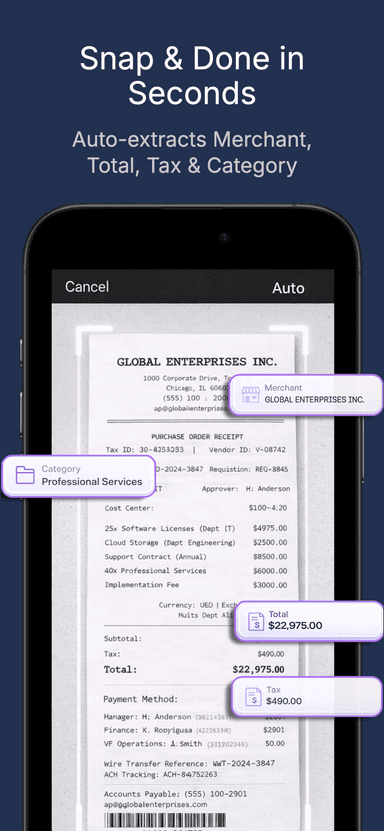
Snap & Done in Seconds.
When you first start freelancing or launch a small business, using a free Excel expense tracker feels like the smart, budget-friendly choice. You set up a few columns for Date, Merchant, and Amount, and tell yourself you'll update it every Friday.
But let's be honest: you never do.
Eventually, tax season rolls around. You are left staring at a blank spreadsheet, surrounded by a mountain of faded paper receipts, trying to remember what a $32 charge from six months ago was for.
While Excel is a powerful tool for data analysts, it is terrible for daily bookkeeping. Here is why professionals are ditching spreadsheets — and what you should use instead.
The 3 Hidden Costs of an Excel Expense Tracker
Free spreadsheets aren't actually free; they cost you hours of unbillable time and lost tax deductions.
✗Manual Data Entry is Dead
Typing merchant names and tax amounts into cells manually is a massive waste of time. Plus, one typo can mess up your entire tax calculation.
✗No Proof for the IRS
An Excel spreadsheet alone won't survive an IRS audit. You still need to keep the physical paper receipt to prove the transaction. Lose the paper, lose the deduction.
✗Not Mobile-Friendly
Try entering a $4 coffee receipt into a complex Excel grid on your iPhone while waiting in line. It's frustrating and nearly impossible.
The Smarter Alternative: AI-Powered Receipt Scanners
Instead of manually typing data into an Excel expense tracker, modern freelancers use AI-powered receipt scanner software like TaxLens.
It takes the exact same process and reduces it from hours to seconds.
Stop manual data entry. Get TaxLens on the App Store.
Free download. No subscription required.
How TaxLens replaces your spreadsheet:
Snap & Done
Just take a photo of your receipt. Our smart AI instantly extracts the date, total, and merchant. No typing required.
Auto-Categorization
It smartly distinguishes between business and personal expenses, organizing them into tax-ready categories automatically.
Audit-Proof Digital Vault
Every expense is securely linked to a high-quality image of the original receipt. Throw the paper away.
Accountant-Ready Exports
Need a spreadsheet for your accountant? Tap one button to export a beautifully formatted CSV or a professional PDF audit packet.
Final Thoughts: Your Time is Your Most Valuable Asset
If you are spending 3 hours a month fighting with an Excel expense tracker, you are losing money you could be making by serving clients.
Stop hoarding paper and manual data entry. Automate your bookkeeping, maximize your tax deductions, and file with confidence.
Your time is worth more than a free spreadsheet.
Ditch the Spreadsheet. Download TaxLens for Free.
Join professionals who save 5+ hours every month on bookkeeping.
Download on the App Store